
Hello everyone!
Problem
You’re given a T-SQL code base and need to answer questions like:
- Which T-SQL scripts have index hints?
- Which scripts use cursors?
- How about those dreaded GOTO statements?
- Which scripts use OPTION (RECOMPILE)?
- Which tables have BIGINT columns?
I have something that can help answer these questions.
Solution
We can use the ANTLR Parser Generator to quickly answer these questions. ANTLR takes a formal grammar that describes a language, such as T-SQL, Java, or JSON, and generates code that can read, understand, and analyze text written in that language.
Fortunately, there is a much easier approach than downloading the ANTLR source code and spending a weekend trying to figure out how to implement it. I tried that myself. It was painful, and even with the help of an LLM, I couldn’t get the results I wanted.
Instead, we can reuse an existing utility called Babelfish Compass. It uses the ANTLR parser generator to analyze a T-SQL code base and identify the syntax constructs found in each SQL file and output a summary report. Syntax constructs are simply the language elements in your SQL code, such as INNER JOIN, SELECT, WHERE, SET options, PIVOT, and many others.
Even better, I created a utility that simplifies running Babelfish Compass and imports the results into an SQLite database for analysis. Think of it as a lightweight front end for Babelfish Compass that handles the tedious work for you. More on this later.
What is Babelfish?
So now you’re probably wondering, “What is Babelfish?”
Babelfish for Aurora PostgreSQL is a built-in translation layer that allows Amazon Aurora PostgreSQL to understand commands and queries originally written for Microsoft SQL Server. It’s an interesting technology and worth checking out, although that’s not the focus of this post.
The Babelfish Compass Utility is a command-line tool that analyzes T-SQL syntax for compatibility with Babelfish for Aurora PostgreSQL. Simply point Compass at a code base, such as a GitHub folder, and choose how you want the results exported, including HTML, CSV, or PostgreSQL.
In this post, we’re repurposing Babelfish Compass for its ANTLR parsing capabilities. We’ll ignore the compatibility assessment and focus on the syntax information it produces. In other words, we want to know which SQL files contain the T-SQL constructs we’re interested in.
If you’d like to learn more about Babelfish for Aurora PostgreSQL, here are a couple of good resources. If you’re a SQL Server developer, it’s worth having a basic understanding of the product.
- Introduction to Babelfish Compass | Amazon Web Services
- Get Up and Running with Babelfish for Aurora PostgreSQL | Amazon Web Services
So what the @#$@ does my utility do?
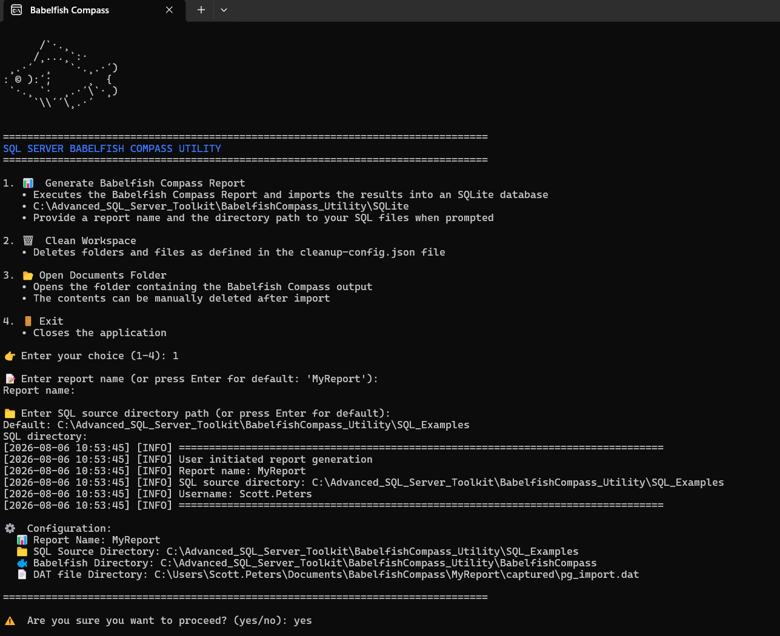
My utility simplifies running the Babelfish Compass Utility. It executes the required command-line options, so you don’t have to read through the Babelfish Compass documentation. No fancy install needed, just download it from my GitHub repo and go.
To execute, double-click the CLI – BablefishCompass Utility file and then provide a report name and the directory containing the SQL files you want to analyze. The utility creates an SQLite database that makes it easy to query the results.
It’s just a few simple Python files with the following interface. The source code is there for your taking. It does require an installation of Python and Java, and if you receive any errors, check the output log file. You can point a LLM at the directory and it will easily be able to help with any obstacles. If you want to upgrade the Babelfish Compass Utility portion to the latest version, simply download the Compass utility from the GitHub and simply replace the BabelfishCompass folder with the latest version.
In this example, I create the report “MyReport” and analyze the SQL files located in C:\Advanced_SQL_Server_Toolkit\BabelfishCompass_Utility\SQL_Examples
What does the utility output?
The output is an SQLite database located in C:\Advanced_SQL_Server_Toolkit\BabelfishCompass_Utility\SQLite
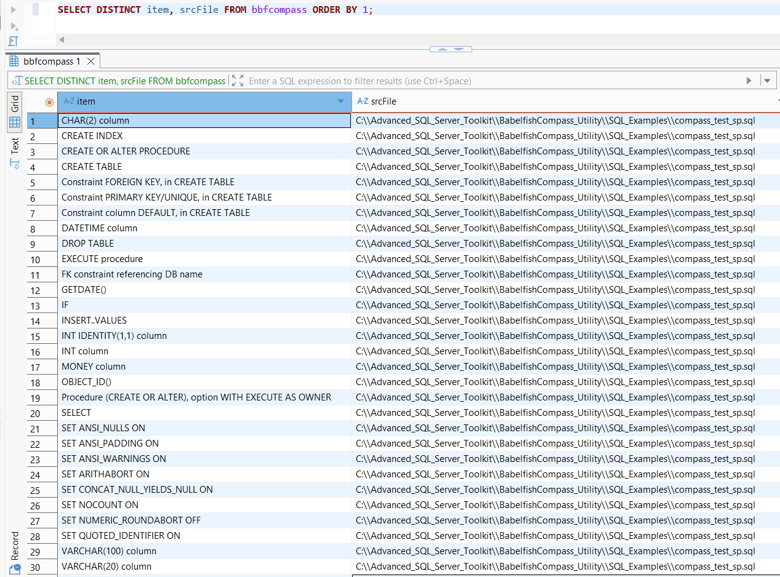
Open the SQLite database and run the following query to view the results.
SELECT DISTINCT item, srcFile FROM bbfcompass ORDER BY 1;
Here you can see the syntax construct in the item column, and the file that contains the construct in the srcFile column.
A few notes are worth mentioning.
Babelfish Compass can generate a data file intended for import into PostgreSQL. I simply execute that option using arbitrary username and password values so the .dat file is created while allowing the PostgreSQL import to fail. I then import the .dat file into SQLite.
This approach eliminates the need to install PostgreSQL and lets you take advantage of SQLite’s simplicity. Since SQLite doesn’t use logins or passwords, there are no credentials to configure or store. Another benefit is that the .dat file produced by the PostgreSQL import option contains more information than the HTML and CSV files generated by the other export options.
What can Babelfish Compass and the ANTLR parser detect?
A lot!
I had an LLM generate a sample T-SQL file containing many of the constructs you might want to discover in a code base, including SET options, index hints, cursors, GOTO statements, OPTION RECOMPILE, etc. I’ve included the sample at the end of this post.
The sample file is ~300 lines long, so instead of walking through it line by line, let’s start by looking at the output from Babelfish Compass.
As you scroll through the list, you’ll quickly see that Babelfish Compass does an excellent job of identifying T-SQL syntax constructs.
Now here is that list of syntax constructs that I was able to gleam from my sample SQL file.
- @@ERROR value 0
- @@ERROR, reference
- @@FETCH_STATUS, reference
- Arithmetic operator +
- Arithmetic operator /
- BIT procedure parameter (with default value)
- BIT variable (with default value)
- CHAR(2) column
- CHAR(2) procedure parameter (with default value)
- CLOSE
- COUNT()
- CREATE INDEX
- CREATE OR ALTER PROCEDURE
- CREATE TABLE
- CREATE TABLE ##globaltmptable
- Comparison operator <>
- Comparison operator =
- Comparison operator >
- Constraint FOREIGN KEY, in CREATE TABLE
- Constraint PRIMARY KEY/UNIQUE, in CREATE TABLE
- Constraint column DEFAULT, in CREATE TABLE
- Cursor option FAST_FORWARD
- Cursor option LOCAL
- Cursor option SCROLL
- DATETIME column
- DATETIME procedure parameter (with default value)
- DEALLOCATE CURSOR
- DECLARE CURSOR
- DELETE, OUTPUT INTO @tableVariable
- DROP TABLE
- ERROR_MESSAGE()
- ERROR_SEVERITY()
- ERROR_STATE()
- EXECUTE procedure
- EXECUTE sp_executesql
- EXECUTE(string)
- EXECUTE(string): dynamic SQL statements must be analyzed manually
- FETCH LAST
- FETCH NEXT
- FK constraint referencing DB name
- GETDATE()
- GOTO label
- IF
- INNER JOIN
- INSERT..VALUES
- INT IDENTITY(1,1) column
- INT column
- INT column (table variable)
- INT procedure parameter (with default value)
- INT variable
- INT variable (with default value)
- LEFT()
- MERGE
- MONEY column
- MONEY column (table variable)
- MONEY variable
- MONEY variable (with default value)
- NVARCHAR(2048) variable (with default value)
- NVARCHAR(MAX) variable
- OBJECT_ID()
- OPEN
- Procedure (CREATE OR ALTER), option WITH EXECUTE AS OWNER
- Procedure (CREATE OR ALTER), option WITH RECOMPILE
- Query hint RECOMPILE
- RAISERROR
- SELECT
- SELECT FOR JSON PATH
- SELECT FOR XML AUTO ELEMENTS
- SELECT TOP <number>
- SELECT TOP without ORDER BY
- SELECT subquery
- SELECT..INTO #tmptable
- SELECT..PIVOT
- SET ANSI_NULLS ON
- SET ANSI_PADDING ON
- SET ANSI_WARNINGS ON
- SET ARITHABORT ON
- SET CONCAT_NULL_YIELDS_NULL ON
- SET IMPLICIT_TRANSACTIONS OFF
- SET NOCOUNT ON
- SET NUMERIC_ROUNDABORT OFF
- SET QUOTED_IDENTIFIER ON
- SET ROWCOUNT 0
- SET ROWCOUNT <number>
- SET XACT_ABORT ON
- SUM()
- String concatenation operator +
- TABLE variable declaration
- TRY-CATCH
- Table hint FORCESCAN
- Table hint FORCESEEK
- Table hint INDEX(index name)
- Table hint NOLOCK
- Table hint ROWLOCK
- Table hint TABLOCK
- Table hint UPDLOCK
- UPDATE
- VARCHAR(100) column
- VARCHAR(20) column
- VARCHAR(20) variable (with default value)
- VARCHAR(MAX) column
- Variable assignment by SELECT @v =
- Variable assignment by SET @v =
- WAITFOR DELAY
- WHILE
- YEAR()
- label: (for GOTO)
- sp_executesql: dynamic SQL statements must be analyzed manually
Summary
The ANTLR Parser Generator is a powerful way to analyze source code, but you don’t have to learn ANTLR or build a parser from scratch to take advantage of it. Babelfish Compass already does the heavy lifting by parsing your T-SQL code and identifying the syntax constructs it contains.
By repurposing Babelfish Compass and importing its output into SQLite, you gain a fast and simple way to answer questions about your code base. Whether you’re looking for index hints, cursors, OPTION RECOMPILE, GOTO statements, table hints, SET options, or hundreds of other T-SQL constructs, you can find them with a few SQL queries instead of manually searching through thousands of lines of code.
I originally built this utility to help analyze code quality and identify code smells in large SQL Server code bases, but I’ve found it useful anytime I need to understand an unfamiliar application. Hopefully you’ll find it just as useful in your own projects.
Here is the code that I ran my analysis on.
SET QUOTED_IDENTIFIER ON
GO
SET ANSI_NULLS ON
GO
SET ANSI_PADDING ON
GO
SET ANSI_WARNINGS ON
GO
SET CONCAT_NULL_YIELDS_NULL ON
GO
SET NUMERIC_ROUNDABORT OFF
GO
SET ARITHABORT ON
GO

IF OBJECT_ID('dbo.Orders',         'U') IS NOT NULL DROP TABLE dbo.Orders;
IF OBJECT_ID('dbo.Customers',      'U') IS NOT NULL DROP TABLE dbo.Customers;
IF OBJECT_ID('dbo.OrderSummary',   'U') IS NOT NULL DROP TABLE dbo.OrderSummary;
GO

CREATE TABLE dbo.Customers (
    CustomerID   INT          NOT NULL PRIMARY KEY,
    CustomerName VARCHAR(100) NOT NULL,
    Region       CHAR(2)      NOT NULL,
    CreditLimit  MONEY        NOT NULL DEFAULT 0,
    CreatedDate  DATETIME     NOT NULL DEFAULT GETDATE()
);

CREATE TABLE dbo.Orders (
    OrderID      INT          NOT NULL PRIMARY KEY IDENTITY(1,1),
    CustomerID   INT          NOT NULL REFERENCES dbo.Customers(CustomerID),
    OrderDate    DATETIME     NOT NULL DEFAULT GETDATE(),
    TotalAmount  MONEY        NOT NULL DEFAULT 0,
    Status       VARCHAR(20)  NOT NULL DEFAULT 'OPEN',
    Notes        VARCHAR(MAX)     NULL
);

CREATE TABLE dbo.OrderSummary (
    Region       CHAR(2)  NOT NULL,
    OrderCount   INT      NOT NULL DEFAULT 0,
    TotalRevenue MONEY    NOT NULL DEFAULT 0
);

CREATE NONCLUSTERED INDEX IX_Orders_CustomerID ON dbo.Orders (CustomerID);
CREATE NONCLUSTERED INDEX IX_Orders_Status     ON dbo.Orders (Status, OrderDate);
GO

CREATE OR ALTER PROCEDURE dbo.usp_CompassTest
    @CustomerID     INT           = NULL,
    @Region         CHAR(2)       = NULL,
    @StartDate      DATETIME      = NULL,
    @EndDate        DATETIME      = NULL,
    @Debug          BIT           = 0
WITH RECOMPILE
AS
BEGIN

    SET NOCOUNT ON;
    SET XACT_ABORT ON;
    SET IMPLICIT_TRANSACTIONS OFF;

    DECLARE @OldStyleError INT;
    DECLARE @GotoTriggered BIT = 0;

    IF OBJECT_ID('tempdb..##GlobalOrderStaging') IS NOT NULL
        DROP TABLE ##GlobalOrderStaging;

    CREATE TABLE ##GlobalOrderStaging (
        OrderID     INT,
        CustomerID  INT,
        TotalAmount MONEY
    );

    SELECT
        o.OrderID,
        o.CustomerID,
        o.TotalAmount,
        o.Status
    INTO #LocalOrderStaging
    FROM dbo.Orders o
    WHERE o.Status = 'OPEN'
    OPTION (RECOMPILE);

    SELECT * FROM dbo.Customers;

    SELECT TOP 10 * FROM dbo.Orders;

    SELECT o.OrderID, o.TotalAmount
    FROM   dbo.Orders o
    WHERE  YEAR(o.OrderDate) = 2025
      AND  LEFT(o.Status, 4) = 'OPEN';


    SELECT o.OrderID
    FROM   dbo.Orders o
    WHERE  o.CustomerID = '42';

    SELECT o.OrderID, o.TotalAmount
    FROM   dbo.Orders o WITH (INDEX(IX_Orders_Status))
    WHERE  o.Status = 'CLOSED';

    SELECT o.OrderID
    FROM   dbo.Orders o WITH (FORCESEEK)
    WHERE  o.CustomerID = @CustomerID;

    SELECT o.OrderID
    FROM   dbo.Orders o WITH (FORCESCAN)
    WHERE  o.TotalAmount > 100;

    SELECT c.CustomerName, o.TotalAmount
    FROM   dbo.Customers c WITH (NOLOCK)
    JOIN   dbo.Orders    o WITH (NOLOCK)
        ON c.CustomerID = o.CustomerID;

    SELECT o.OrderID
    FROM   dbo.Orders o WITH (ROWLOCK, UPDLOCK)
    WHERE  o.Status = 'OPEN';

    SELECT o.OrderID
    FROM   dbo.Orders o WITH (TABLOCK)
    WHERE  o.TotalAmount > 500;

    DECLARE @CurOrderID     INT;
    DECLARE @CurAmount      MONEY;
    DECLARE @RunningTotal   MONEY = 0;

    DECLARE cur_Orders CURSOR
        LOCAL FAST_FORWARD
    FOR
        SELECT OrderID, TotalAmount
        FROM   dbo.Orders
        WHERE  Status = 'OPEN'
        ORDER  BY OrderDate;

    OPEN cur_Orders;
    FETCH NEXT FROM cur_Orders INTO @CurOrderID, @CurAmount;

    WHILE @@FETCH_STATUS = 0
    BEGIN
        SET @RunningTotal = @RunningTotal + @CurAmount;

        IF @Debug = 1
            WAITFOR DELAY '00:00:00.010';  -- [CAT-24]

        FETCH NEXT FROM cur_Orders INTO @CurOrderID, @CurAmount;
    END

    CLOSE cur_Orders;
    DEALLOCATE cur_Orders;

    DECLARE cur_Scroll CURSOR
        LOCAL SCROLL
    FOR
        SELECT CustomerID, CustomerName FROM dbo.Customers;

    OPEN cur_Scroll;
    FETCH LAST FROM cur_Scroll INTO @CustomerID, @Region;
    CLOSE cur_Scroll;
    DEALLOCATE cur_Scroll;

    DECLARE @DynamicSQL  NVARCHAR(MAX);
    DECLARE @FilterValue VARCHAR(20) = 'OPEN';

    SET @DynamicSQL = 'SELECT OrderID, TotalAmount FROM dbo.Orders WHERE Status = '''
                      + @FilterValue + '''';
    EXEC (@DynamicSQL);              -- [CAT-05a]

    SET @DynamicSQL = N'SELECT OrderID, TotalAmount
                        FROM   dbo.Orders
                        WHERE  Status       = @Status
                          AND  (@CustID IS NULL OR CustomerID = @CustID)';

    EXEC sp_executesql
        @DynamicSQL,
        N'@Status VARCHAR(20), @CustID INT',
        @Status = 'OPEN',
        @CustID = @CustomerID;

    SELECT CustomerID, CustomerName
    FROM   dbo.Customers
    FOR XML AUTO, ELEMENTS;

    SELECT CustomerID, CustomerName
    FROM   dbo.Customers
    FOR JSON PATH;

    SELECT *
    FROM (
        SELECT Region, TotalAmount FROM dbo.Orders o
        JOIN   dbo.Customers c ON c.CustomerID = o.CustomerID
    ) src
    PIVOT (
        SUM(TotalAmount)
        FOR Region IN ([NE],[SE],[MW],[WE])
    ) pvt;

    MERGE dbo.OrderSummary AS tgt
    USING (
        SELECT c.Region,
               COUNT(*)    AS OrderCount,
               SUM(o.TotalAmount) AS TotalRevenue
        FROM   dbo.Orders o
        JOIN   dbo.Customers c ON c.CustomerID = o.CustomerID
        GROUP  BY c.Region
    ) AS src (Region, OrderCount, TotalRevenue)
    ON tgt.Region = src.Region
    WHEN MATCHED THEN
        UPDATE SET tgt.OrderCount   = src.OrderCount,
                   tgt.TotalRevenue = src.TotalRevenue
    WHEN NOT MATCHED BY TARGET THEN
        INSERT (Region, OrderCount, TotalRevenue)
        VALUES (src.Region, src.OrderCount, src.TotalRevenue)
    WHEN NOT MATCHED BY SOURCE THEN
        DELETE;

    DECLARE @DeletedOrders TABLE (OrderID INT, TotalAmount MONEY);

    DELETE FROM dbo.Orders
    OUTPUT deleted.OrderID, deleted.TotalAmount
    INTO   @DeletedOrders
    WHERE  Status = 'CANCELLED';

    UPDATE o
    SET    o.Status = 'REVIEWED'
    FROM   dbo.Orders    o
    JOIN   dbo.Customers c ON c.CustomerID = o.CustomerID
    WHERE  c.Region = @Region;


    SELECT @OldStyleError = @@ERROR;

    IF @OldStyleError <> 0
    BEGIN
        RAISERROR('Legacy error handling detected: %d', 16, 1, @OldStyleError);
        GOTO CleanupLabel;
    END

    BEGIN TRY

        DECLARE @Zero INT = 0;
        SELECT 1 / @Zero;
    END TRY
    BEGIN CATCH
        DECLARE @ErrMsg  NVARCHAR(2048) = ERROR_MESSAGE();
        DECLARE @ErrSev  INT            = ERROR_SEVERITY();
        DECLARE @ErrStat INT            = ERROR_STATE();

        RAISERROR(@ErrMsg, @ErrSev, @ErrStat);
    END CATCH

    SELECT
        c.CustomerID,
        c.CustomerName,
        (SELECT COUNT(*)
         FROM   dbo.Orders o
         WHERE  o.CustomerID = c.CustomerID
           AND  o.Status = 'OPEN') AS OpenOrderCount
    FROM dbo.Customers c;

    SET ROWCOUNT 100;
    SELECT OrderID FROM dbo.Orders;
    SET ROWCOUNT 0;

    CleanupLabel:
        IF OBJECT_ID('tempdb..##GlobalOrderStaging') IS NOT NULL
            DROP TABLE ##GlobalOrderStaging;

        IF OBJECT_ID('tempdb..#LocalOrderStaging') IS NOT NULL
            DROP TABLE #LocalOrderStaging;

END;
GO

CREATE OR ALTER PROCEDURE dbo.usp_CompassTest_Impersonated
WITH EXECUTE AS OWNER
AS
BEGIN
    SET NOCOUNT ON;
    SELECT 'Running as owner' AS ExecutionContext;
END;
GO

INSERT INTO dbo.Customers (CustomerID, CustomerName, Region, CreditLimit)
VALUES (1, 'Acme Corp',    'NE', 10000),
       (2, 'Globex Ltd',   'SE', 25000),
       (3, 'Initech',      'MW',  5000);

INSERT INTO dbo.Orders (CustomerID, TotalAmount, Status)
VALUES (1,  250.00, 'OPEN'),
       (1, 1200.00, 'CLOSED'),
       (2,  875.50, 'OPEN'),
       (3,   42.00, 'CANCELLED');
GO

EXEC dbo.usp_CompassTest @Debug = 0;
GO
Hope this all made sense! Happy coding.